Number Pop-Up Planner Stickers: Enhance Visual Organization
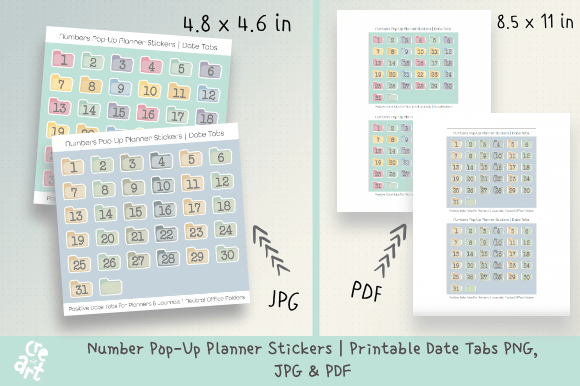
Transform chaotic schedules into a clear, visual system with thoughtfully designed graphic assets. Number Pop-Up Planner Stickers, designed as folder-style date tabs, offer a sophisticated yet playful solution for organizing days, months, budgets, and projects. This set, featuring both soft pastel folders and neutral office tones, provides the flexibility to match various planner moods, seasons, or layouts, making it a versatile tool in any designer's or planner enthusiast's toolkit.
The Role of Visual Hierarchy in Modern Planning
Effective visual communication relies on clear hierarchy. These stickers use a distinct folder tab format to create an immediate visual anchor for each day or category. This approach leverages principles of UI design and editorial layout, where consistent, recognizable elements guide the user's eye and improve usability. The inclusion of numbers 1-31 and a blank tab allows for customized systems, whether for tracking project milestones in a bullet journal or highlighting key dates in a digital marketing calendar.
Practical Applications Across Creative Projects
The utility of such organized design elements extends far beyond personal planners. Consider their application in broader creative and professional contexts:
- Brand Identity & Marketing Collateral: Use consistent numbering systems in brand style guides, internal documents, or promotional materials to reinforce brand identity through meticulous organization.
- Social Media & Digital Marketing: Create a series of themed posts or stories with sequential numbering for campaigns, tutorials, or countdowns, enhancing user engagement and content flow.
- Editorial Design & Presentations: Numbered tabs are invaluable in magazine layouts, report sections, or presentation decks to create a polished, professional, and easy-to-navigate narrative.
- Packaging Design & Merchandise: Incorporate numbered elements into packaging series, collectible items, or instructional guides to add a layer of interactive organization and collectibility.
Integrating Design Assets with Existing Systems
When selecting design assets like these planner stickers, consistency is paramount. The dual color palettes—pastel and neutral—allow creators to maintain visual harmony across different projects or seasonal themes. Evaluate such assets for scalability (they are provided in PNG, JPG, and PDF formats), readability of the typography, and compatibility with your existing color palette and design workflow. A cohesive visual language strengthens any project, whether it's a personal journal or a client-facing presentation.
Tips for Effective Implementation
Maximize the impact of organized visual elements by considering these factors:
- Define the Purpose: Are you tracking tasks, creating a timeline, or categorizing information? Let the function guide your layout.
- Maintain Contrast: Ensure your numbered tabs stand out against the background for quick recognition, a key principle in UX design.
- Embrace Flexibility: Use the blank tabs for custom categories, icons, or notes to tailor the system perfectly to your needs.
Ultimately, the strength of any design lies in its ability to communicate information effortlessly and beautifully. Quality creative assets, from typography solutions to organized sticker sets, are not merely decorative; they are functional tools that enhance clarity, save time, and elevate the aesthetic of any project. By making thoughtful choices in these resources, creators can ensure their work is not only visually appealing but also structurally sound and professionally presented.